Lead Managementby Invexbook

For solar, software and trading companies

From the first enquiry to the last service visit — in one place.

Lead Management brings your leads, quotes, payments, deliveries, stock, service and team together. The office works on the web; sales, field teams, customers and partners work on their phones.

Already a customer? Sign in with your Invexbook account — one sign-in for every Invexbook product.
  • Web console for the office
  • Android app for the field
  • Rupees in lakh, April–March years
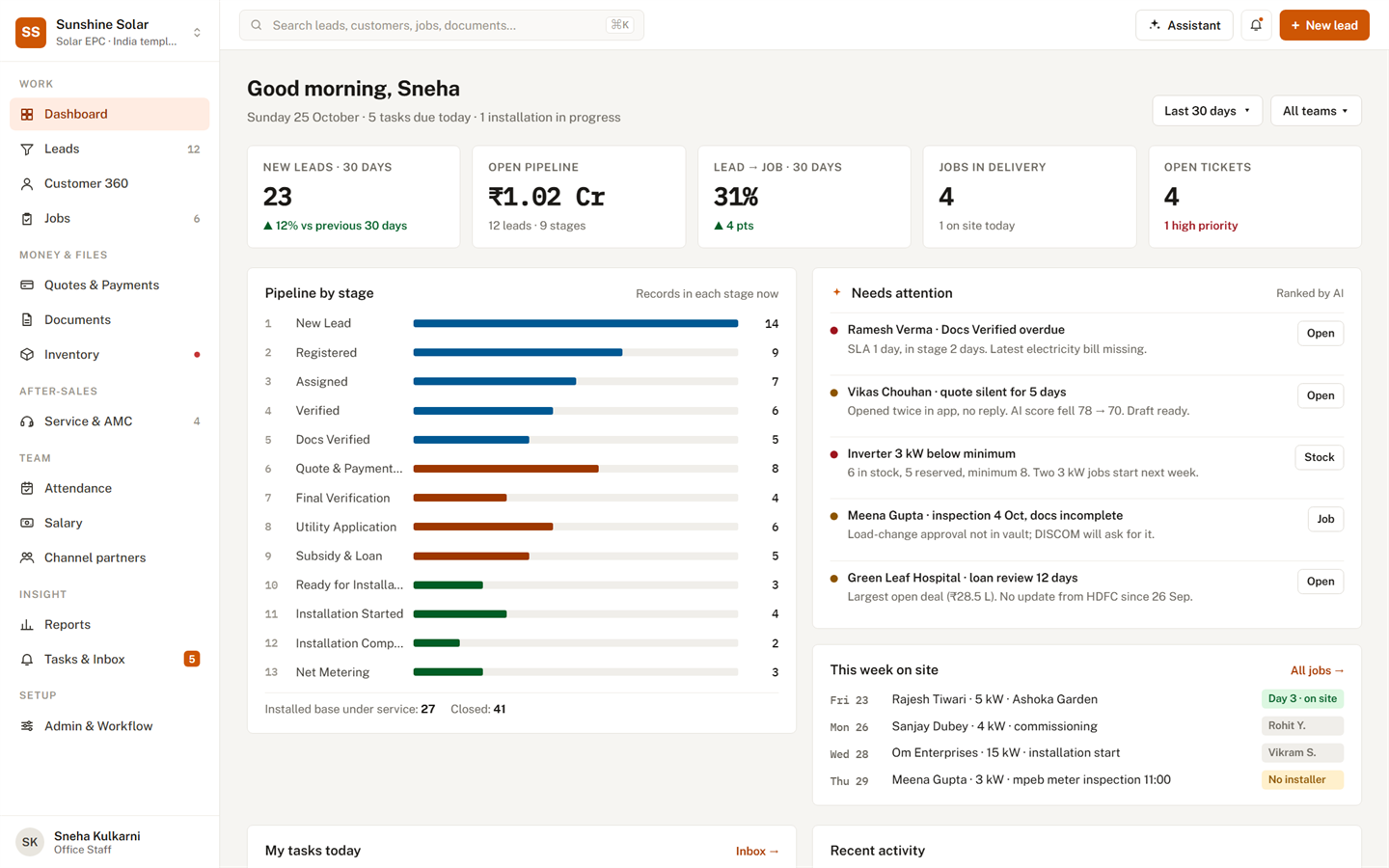
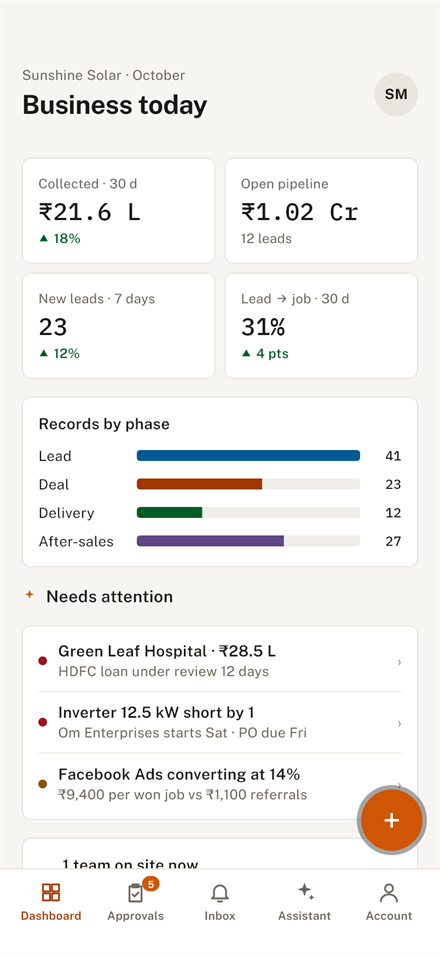
The Lead Management dashboard: new leads, open pipeline, conversion, jobs in delivery, the pipeline by stage and what needs attention today.
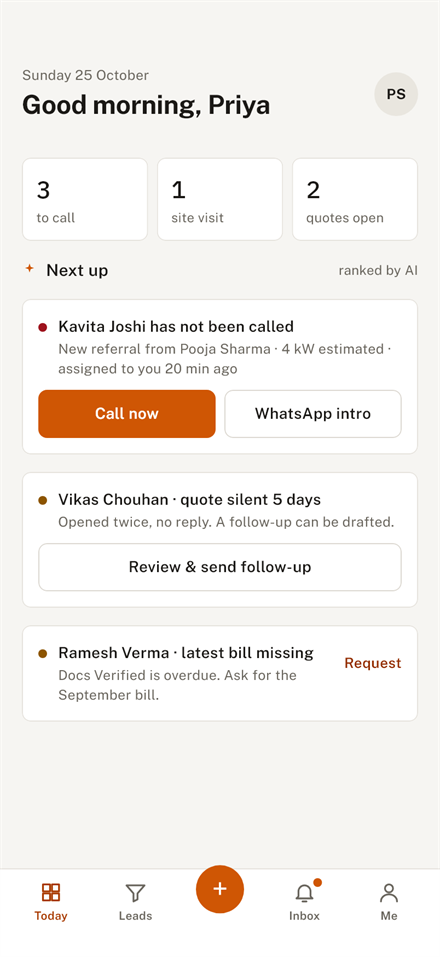
The sales app's Today screen: who to call next, ranked.
3ready workflows — solar EPC, software and trading — that you can reshape
5phone apps in one: sales, field team, owner and office, customer, partner
23business reports, each one click away from an Excel file
12permissions across 8 roles, so everyone sees only their part

Why companies switch

Stop running your sales from WhatsApp groups, notebooks and spreadsheets.

Before

Enquiries slip through the cracks

A lead from an ad or a walk-in sits in someone's phone, and nobody calls back.


With Lead Management

Every enquiry lands in one pipeline with an owner, and is flagged if nobody calls in time.

Before

Deals stall between departments

Paperwork, approvals and hand-overs wait, and nobody can say where or for how long.


With Lead Management

Each step has an owner, a time limit and a checklist, and late steps show up on everyone's list.

Before

Money owed, and nobody chasing it

The work is done, but the last payment is still out and nobody noticed.


With Lead Management

Payments are tied to the steps of the work, so what is due — and overdue — is always in view.

Built for how you sell

Start from a ready workflow. Then make it yours.

Pick the template for your trade, then rename stages, change owners, time limits, checklists and forms — no programmer needed.

Rooftop solar, from survey to net metering

  1. New Lead
  2. Registered
  3. Assigned
  4. Verified
  5. Docs Verified
  6. Quote & Payment Mode
  7. Final Verification
  8. Utility Application
  9. Subsidy & Loan
  10. Ready for Installation
  11. Installation Started
  12. Installation Complete
  13. Net Metering
  14. Service & Maintenance
  15. Closed
  • Subsidy and bank-loan status for every customer, and the utility paperwork tracked to the day
  • Site checklist with photos, serial numbers scanned on the phone, and a commissioning report that starts the warranty
  • AMC contracts with visits due, and a homeowner app for project updates and payments

How it works

Every customer moves through four phases.

Whatever you sell, each record is always somewhere on this line — with someone responsible for the next step.

PHASE 1

Lead

Capture enquiries from the field, the office or a CSV file. Call fast, qualify, collect what you need.

PHASE 2

Deal

Send the quote, agree how it is paid, and take the first payment against the order.

PHASE 3

Delivery

Plan the work, issue stock, tick the checklist on site and hand over with proof.

PHASE 4

After-sales

Service tickets, maintenance visits and warranty claims — and the next sale.

Leads and pipeline
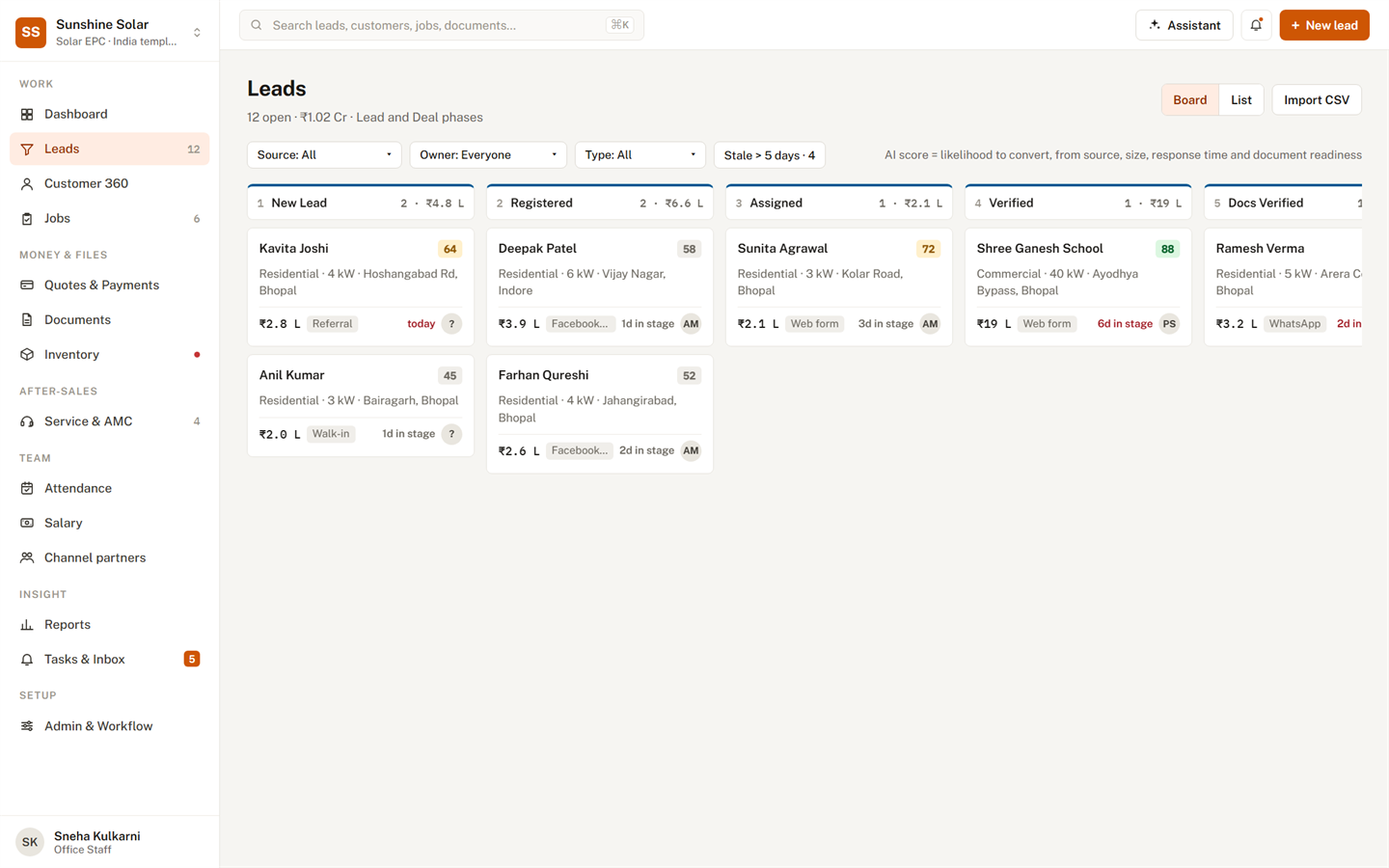
See every lead, and what it needs next.

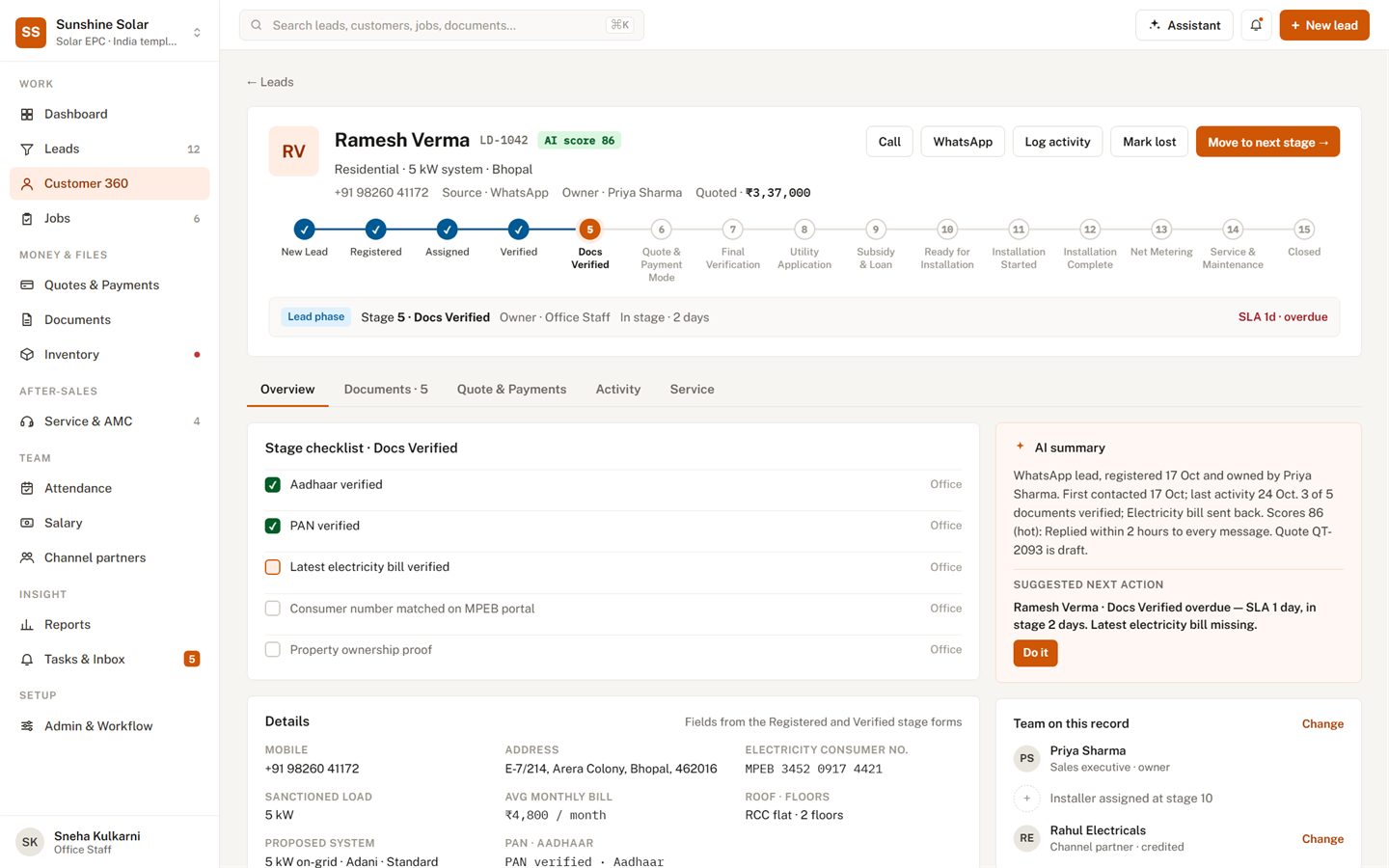
  • A board of every stage, with time limits that turn red when they slip
  • Each customer's documents, checklist, quote and history on one page
  • A score that says which leads are hot, and why
The leads board: every lead in columns by stage, with its value, source and days in the stage.

Quotes and money

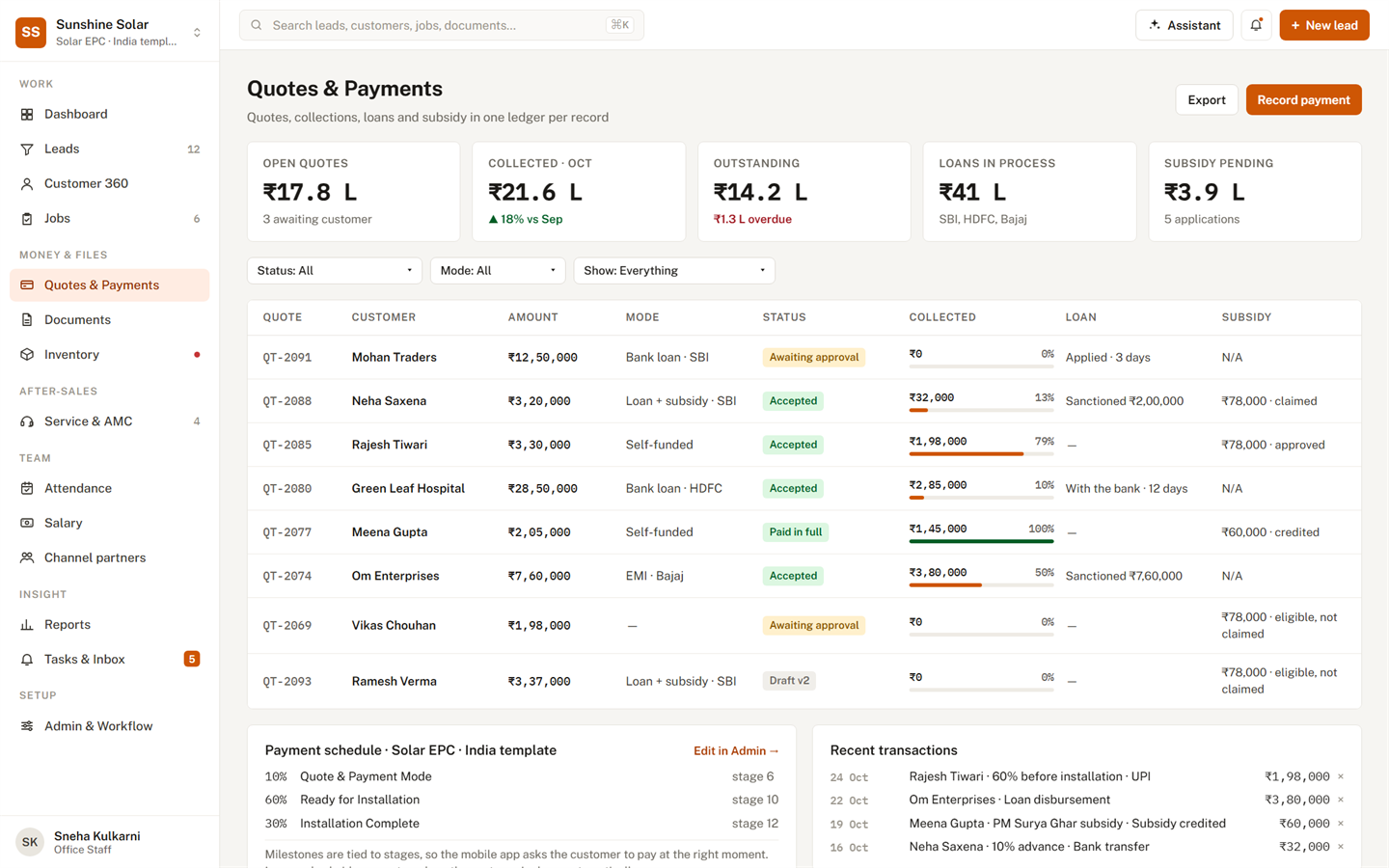
Quote, collect and keep track of every rupee.

  • Quote versions the customer accepts or turns down, with the reason kept
  • Payments by UPI, bank, cash or cheque, each with its reference
  • Bank loans and subsidies followed for every customer who needs them
Quotes and payments: each quote with its status, what has been collected and what is due.

Delivery and stock

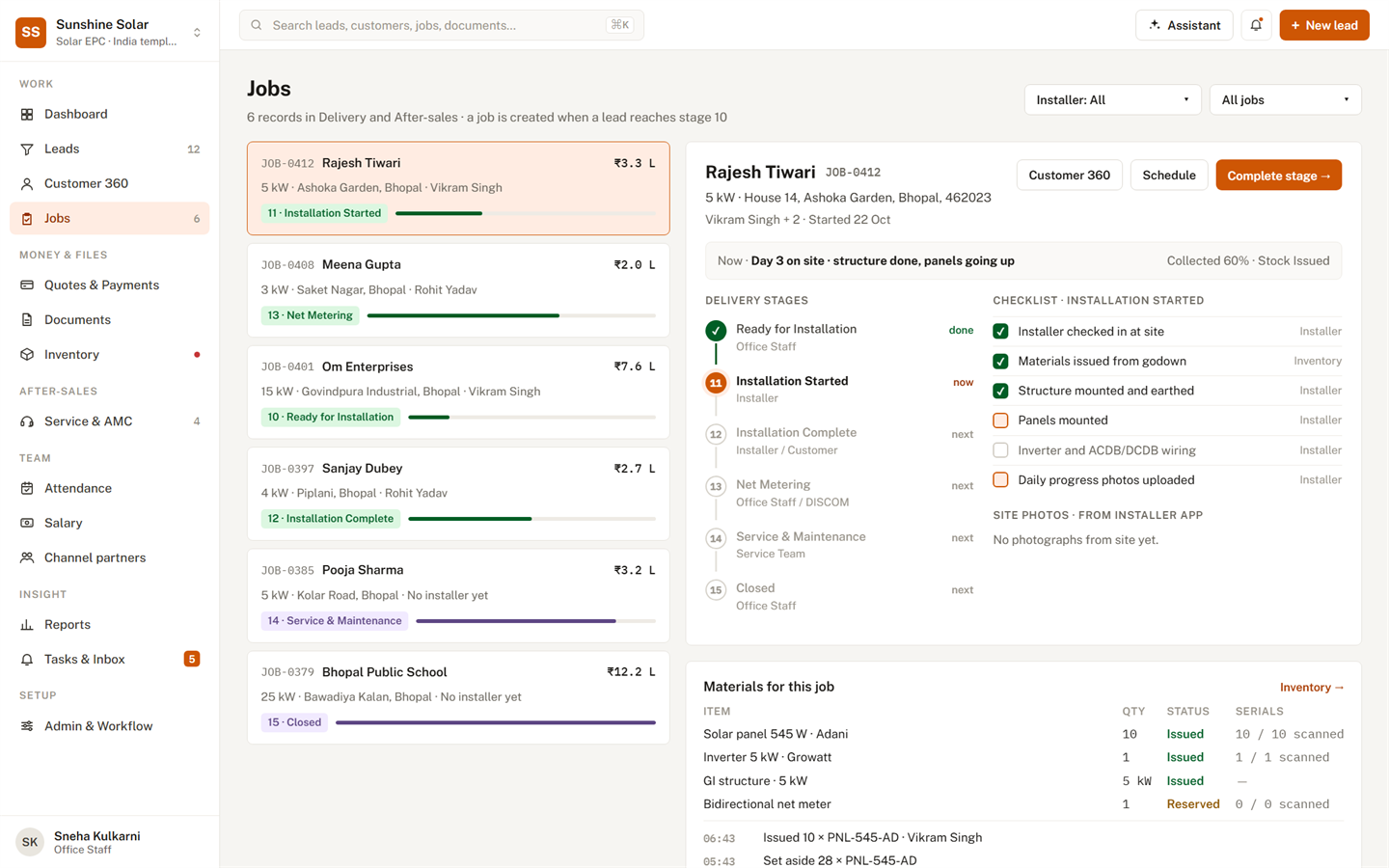
Every job, from the godown to hand-over.

  • Book the team, set stock aside and issue it to the job
  • Site checklist with photos and serial numbers from the phone
  • What each job cost — material, labour, transport, fees — beside what it earned
A job: its delivery stages, the site checklist, the materials issued and the serial numbers.

Reports

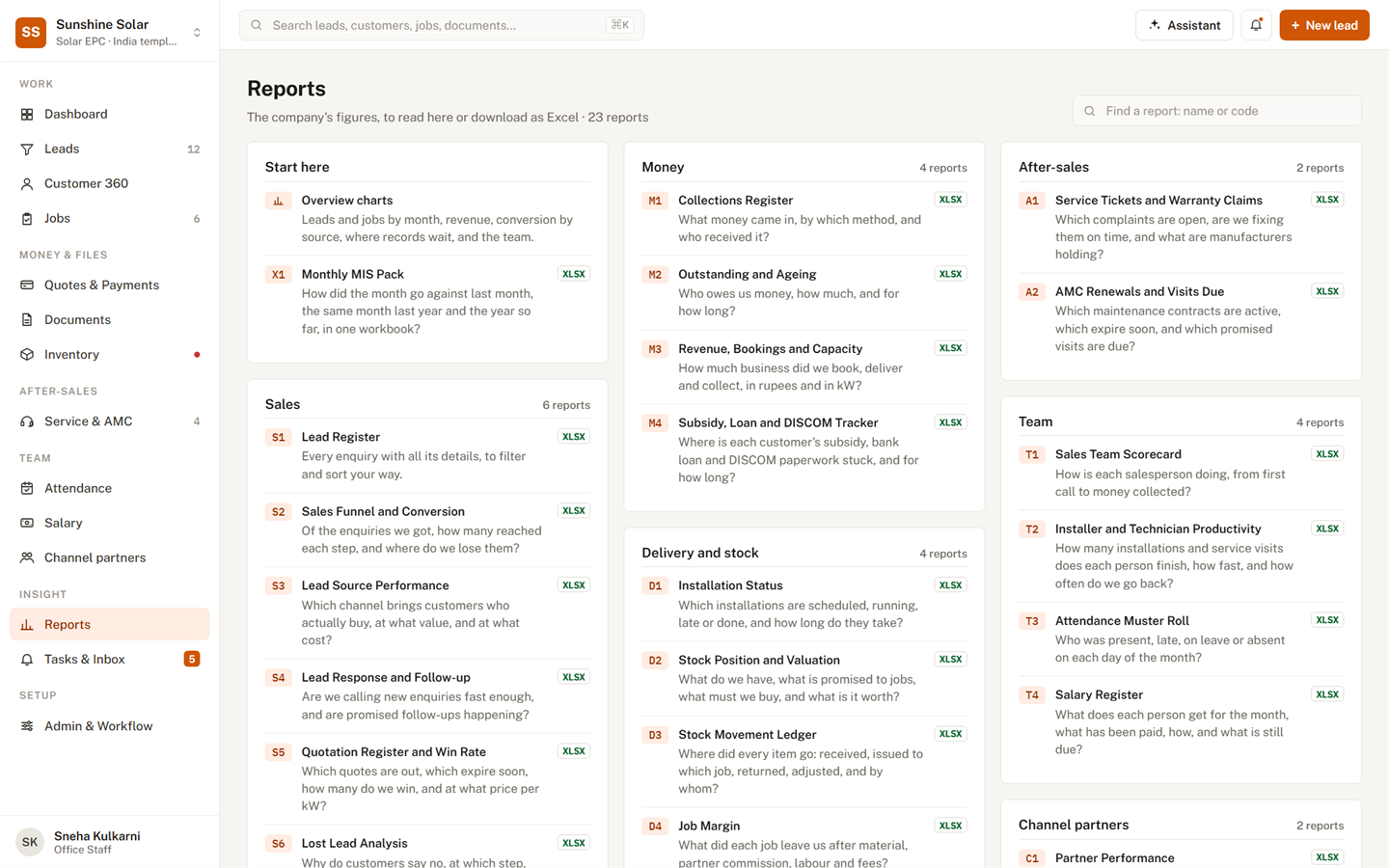
Know your numbers — and send them to Excel.

  • 23 reports, from the lead register to the margin on each job
  • A monthly MIS pack: the month against last month, last year and the year so far
  • Indian number format and April–March financial years, ready to print
Reports home: sales, money, delivery, after-sales, team and partner reports, each downloadable as Excel.

And everything around it

Everything around the sale, in the same place.

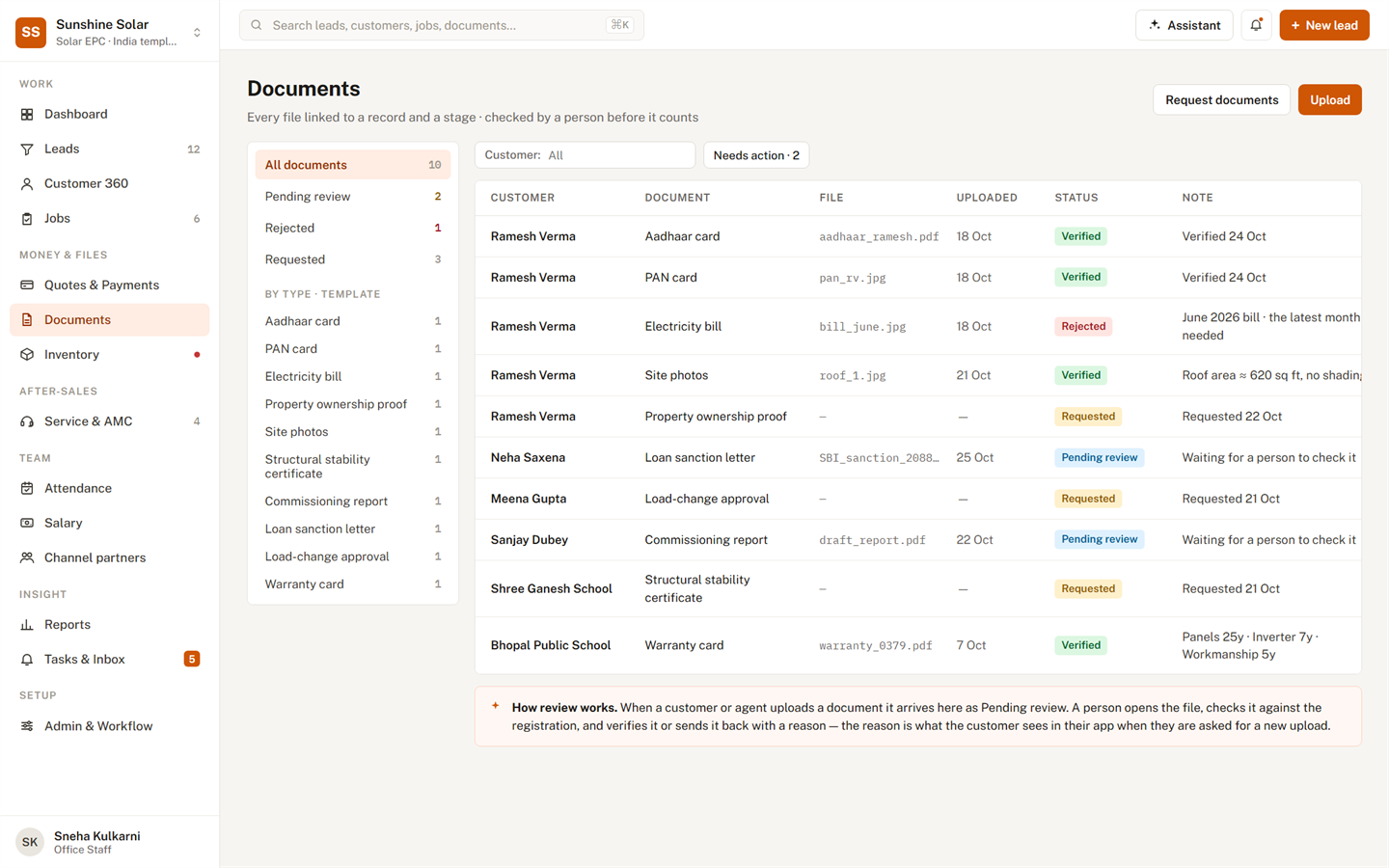
Documents

Ask for a file, check it, and send it back with a reason.

Service and AMC

Complaints, maintenance visits and warranty claims, on time.

Inventory

What you have, what is promised, what to buy, and its value.

Attendance and salary

Start Day on the phone; the month's salary worked out from it.

Channel partners

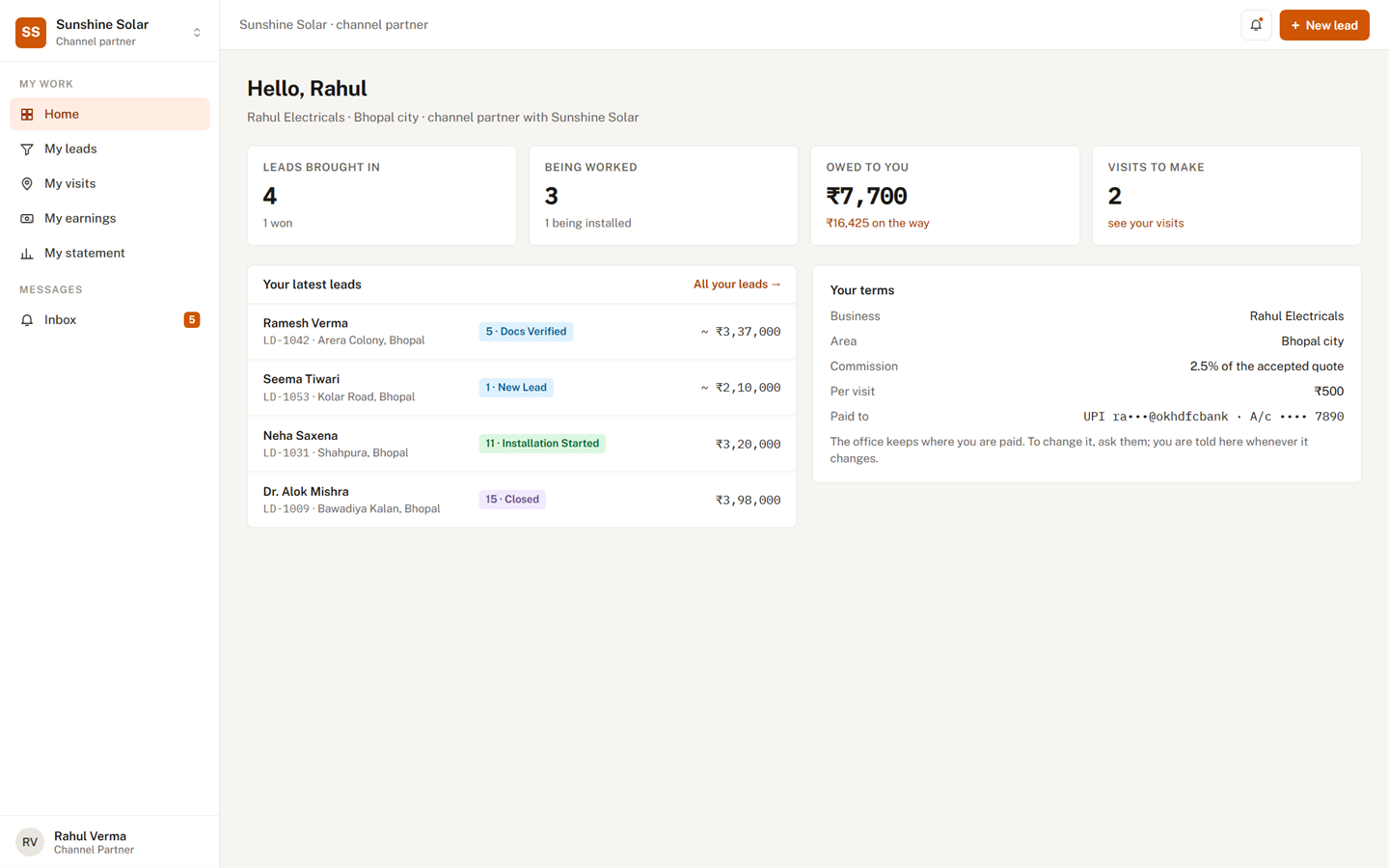
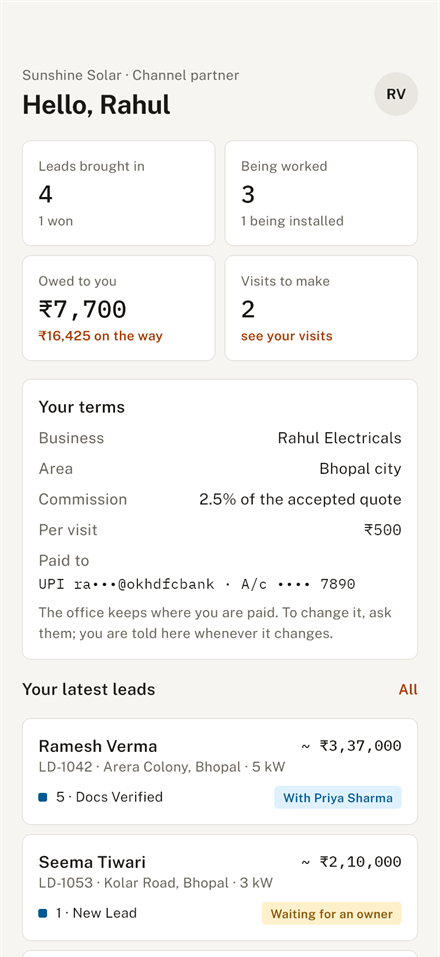
Partners bring leads, follow them, and see their commission.

Customer app

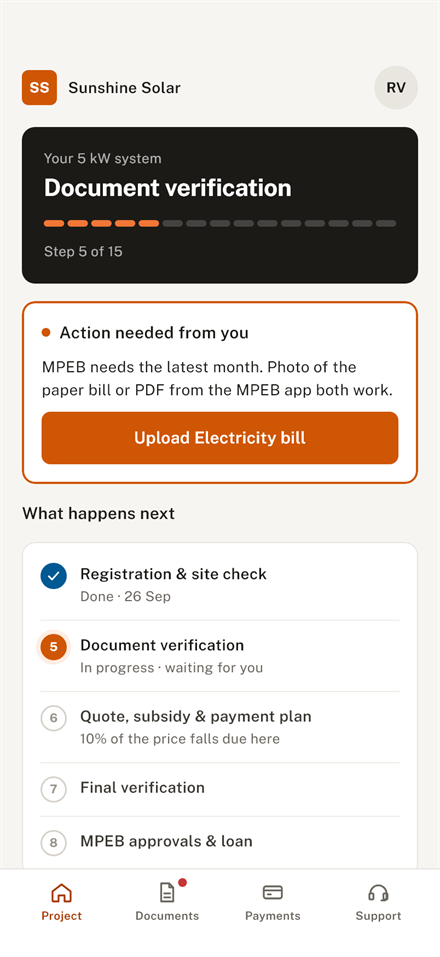
Customers follow their project and payments, and raise a ticket.

Tasks and alerts

Everyone's list of what is late or due, and screens that update live.

Your workflow

Stages, owners, time limits, checklists and forms — all yours to change.

One product, every person
Each person sees exactly their part of the work.

For the owner

  • Start the day with what needs attention, ranked
  • Approve, reassign and chase from your phone
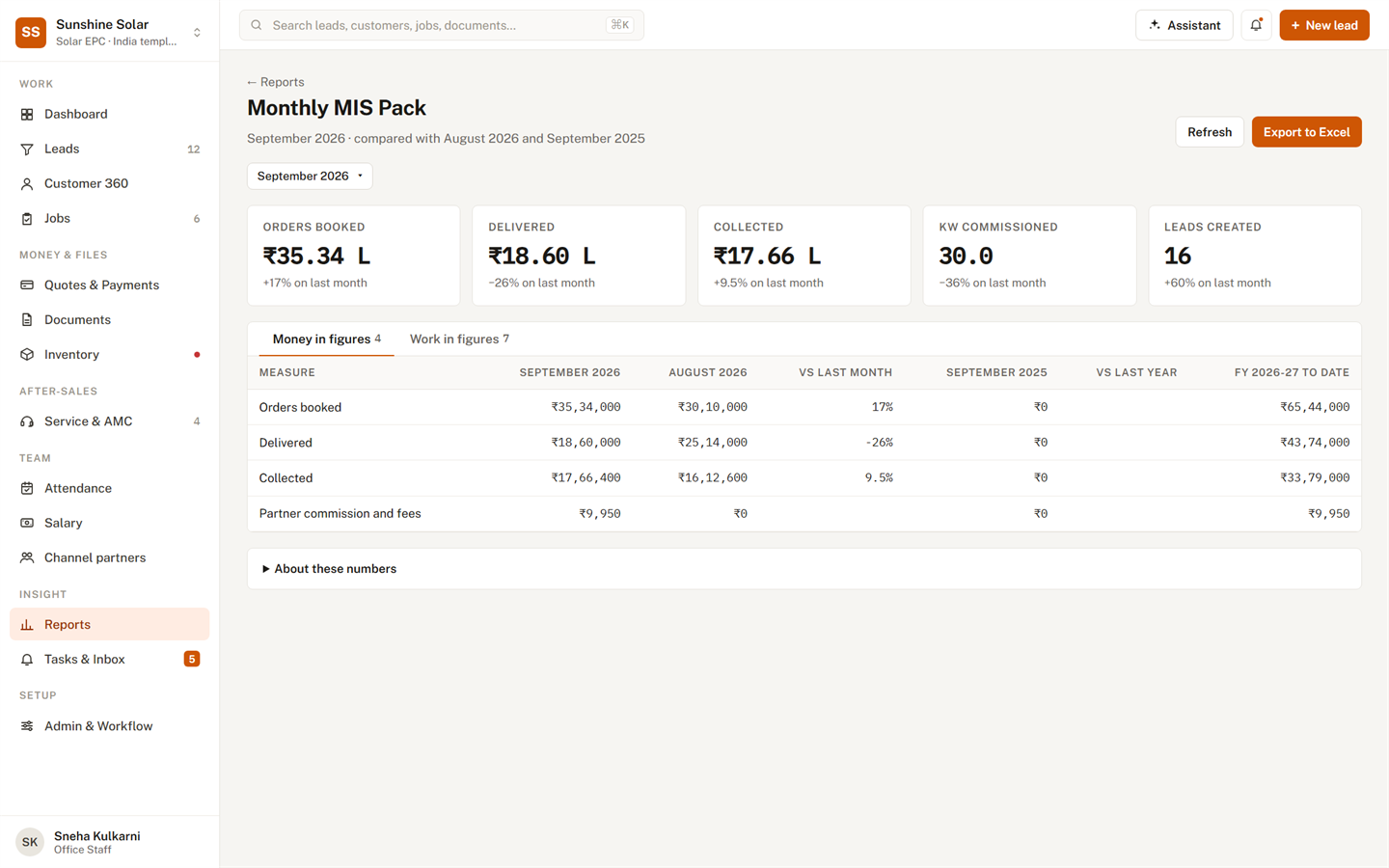
  • Close the month with the MIS pack in Excel
The monthly MIS pack: orders booked, delivered, collected and leads, against last month.

On the phone

Built for the road, the site and the customer's front door.

One Android app that shows each person their own screens — from capturing a lead to reading the month's figures.
The sales app's Today screen.
SalesWho to call next
The owner's dashboard on the phone.
Owner and officeThe business today
The customer's project screen.
CustomerTheir project, step by step
A channel partner's home screen.
Channel partnerLeads and earnings

To get the app, ask your company administrator.

AI that assists

An assistant that suggests. You decide.

It never moves a lead or messages a customer on its own.

Scores every lead — and shows why

From its source, its size, how fast you answered and which documents are in.

Suggests the next step and the right person

Collections due, quotes waiting, deliveries at risk, leads going cold.

Drafts the follow-up — a person sends it

Copy it, change it, and send it from your own phone.

Trust and security

Your company's data stays your company's.

One sign-in

Your Invexbook account opens this and every other Invexbook product.

Walled off from other companies

Separated in the application and in the database itself.

Roles and permissions

Sales see their own leads; partners see only their customers.

Every change recorded

An audit log of who did what and when, Excel downloads included.

Customer numbers protected

Reports hide mobile numbers from everyone but the owner.

Payout details protected

Partners' bank and UPI details are stored encrypted.

Before switching to this lead management application, our sales team at Sunshine Solar was juggling spreadsheets, sticky notes, and missed follow-ups. Within the first month, we had every inquiry tracked in one place, automated reminders kept our reps on schedule, and our lead-to-site-visit conversion improved noticeably. The pipeline view alone has saved us hours every week. It's simple, reliable, and built for how a solar business actually sells.
— Arjab Jain, Sunshine Solar

FAQ

Questions people ask

Do we need to install anything?

The office uses it in a web browser. Sales, field teams, customers and partners use the Android app.

How do we get the Android app?

Ask your company administrator. They share the app with your team.

Can we change the stages to match how we work?

Yes. Your administrator edits the stages, owners, time limits, checklists and forms, or starts from the solar, software or trading template.

Can our channel partners use it?

Yes. They bring in leads, follow them and see their earnings — and nothing else.

Can we get our data into Excel?

Every report downloads as an Excel workbook, and existing leads can be brought in from a CSV file.

Does the AI contact our customers by itself?

No. It drafts follow-ups; a person reads and sends them.

How is our data kept apart from other companies?

Each company's records are separated in the application and in the database itself.

Book a demo

See it with your own kind of business.

Tell us a little about your company and we will show you Lead Management set up for how you sell.

  1. We call you to fix a time that suits you.
  2. We walk you through it with a workflow like yours — solar, software or trading.
  3. You decide. There is nothing to install for the office.
Rather talk now? contact@invexbook.com +91 858 6868 598 Bhopal, India

We use these details only to contact you about a demo. See our privacy notice.